Slash LogoSlash

Fast bookmark management with fuzzy search. Access your bookmarks instantly from anywhere.

퍼지 검색으로 빠른 북마크 관리.
어디서나 즉시 북마크에 접근하세요.

⚡ Fuzzy Search

⚡ 퍼지 검색

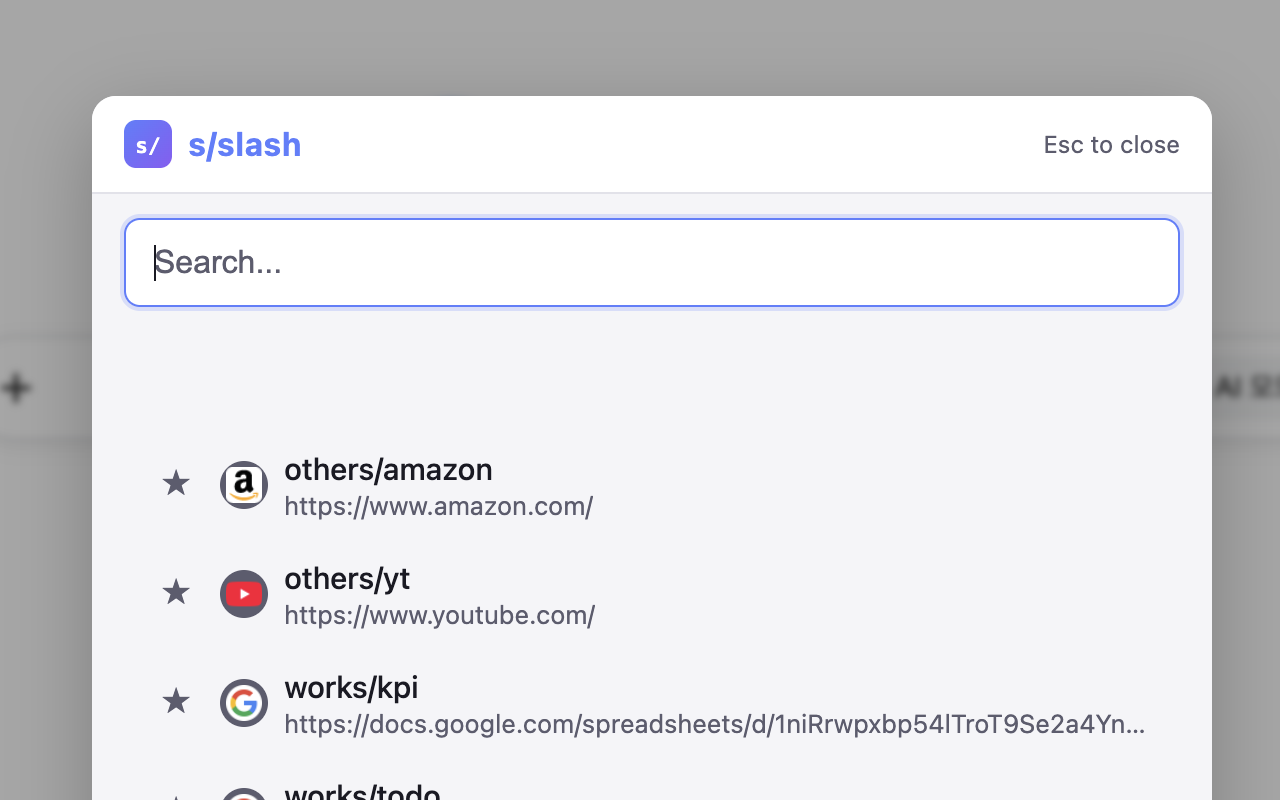
+ . to search bookmarks instantly

+ . 으로 북마크 즉시 검색

Fuzzy search overlay

🎯 Quick Navigate

🎯 빠른 이동

Type s/path/to in address bar to jump directly

주소창에 s/path/to 입력으로 바로 이동

Address bar quick navigation

Get Started

시작하기

🌐 Chrome Extension

🌐 Chrome 확장 프로그램

The core of Slash.
Install the Chrome extension to get started with fast bookmark management.

Slash의 핵심입니다.
Chrome 확장 프로그램을 설치하여 빠른 북마크 관리를 시작하세요.

Key Features:

  • ⚡ Instant fuzzy search from address bar (type "/" to activate)
  • ⭐ Mark frequently used bookmarks as favorites
  • 📁 Choose custom root bookmark folder
  • ⌨️ Keyboard shortcuts for quick access
  • 🌐 Multi-language support (English, Korean)
  • 🔒 100% local - no data leaves your device

주요 기능:

  • ⚡ 주소창에서 즉시 퍼지 검색 ("/" 입력으로 활성화)
  • ⭐ 자주 사용하는 북마크를 즐겨찾기로 표시
  • 📁 커스텀 루트 북마크 폴더 선택
  • ⌨️ 빠른 접근을 위한 키보드 단축키
  • 🌐 다국어 지원 (영어, 한국어)
  • 🔒 100% 로컬 - 데이터가 기기를 벗어나지 않음
Install from Chrome Web Store Chrome 웹 스토어에서 설치

Note: Works with Chrome, Edge, Brave, and other Chromium-based browsers.

참고: Chrome, Edge, Brave 및 기타 Chromium 기반 브라우저에서 작동합니다.

Features

주요 기능

⚡ Fuzzy Search⚡ 퍼지 검색

Find your bookmarks instantly with intelligent fuzzy search. Type a few characters and get exactly what you need.

지능형 퍼지 검색으로 북마크를 즉시 찾으세요. 몇 글자만 입력하면 원하는 것을 정확히 찾을 수 있습니다.

🎯 Quick Access🎯 빠른 접근

Access bookmarks directly from your browser's address bar. No need to open menus or navigate through folders.

브라우저 주소창에서 바로 북마크에 접근하세요. 메뉴를 열거나 폴더를 탐색할 필요가 없습니다.

📂 Smart Organization📂 스마트 정리

Manage your bookmarks efficiently with favorites, custom root folders, and intuitive organization.

즐겨찾기, 커스텀 루트 폴더, 직관적인 구성으로 북마크를 효율적으로 관리하세요.

🧩 Extensible🧩 확장 가능

Chrome extension as the core, with optional desktop and CLI plugins for enhanced functionality.

Chrome 확장 프로그램을 핵심으로, 선택적으로 데스크톱과 CLI 플러그인으로 기능을 확장할 수 있습니다.

🔒 Privacy First🔒 프라이버시 우선

All data stays local. No tracking, no cloud sync, no data collection. Your bookmarks are yours alone.

모든 데이터는 로컬에 저장됩니다. 추적 없음, 클라우드 동기화 없음, 데이터 수집 없음. 북마크는 오직 당신의 것입니다.

🌐 Multi-language🌐 다국어 지원

Support for multiple languages including English and Korean, with more coming soon.

영어와 한국어를 포함한 다국어를 지원하며, 더 많은 언어가 추가될 예정입니다.

Extend with Desktop & CLI

데스크톱 & CLI로 확장

Optional plugins to enhance your Slash experience

Slash 경험을 향상시키는 선택적 플러그인

💻 Desktop App💻 데스크톱 앱

Native desktop application for macOS and Windows. Access bookmarks with global shortcuts even when browser is closed. Features system tray integration and auto-launch on startup.

macOS, Windows용 네이티브 데스크톱 애플리케이션. 브라우저가 닫혀있어도 전역 단축키로 북마크에 접근. 시스템 트레이 통합 및 시작 시 자동 실행 기능.

curl -fsSL https://ytw0728.github.io/docs/slash/install.desktop.mac.sh | bash
irm https://ytw0728.github.io/docs/slash/install.desktop.win.ps1 | iex

⌨️ CLI Tool⌨️ CLI 도구

Command-line interface for power users. Search and open bookmarks directly from your terminal. Perfect for integrating into scripts and workflows.

파워 유저를 위한 커맨드라인 인터페이스. 터미널에서 직접 북마크를 검색하고 열 수 있습니다. 스크립트와 워크플로우에 통합하기 완벽합니다.

curl -fsSL https://ytw0728.github.io/docs/slash/install.mac.sh | bash
irm https://ytw0728.github.io/docs/slash/install.win.ps1 | iex

Get Started Today

지금 시작하세요

Start with the Chrome extension and expand with desktop or CLI as needed.

Chrome 확장 프로그램으로 시작하고 필요에 따라 데스크톱이나 CLI로 확장하세요.

Install Chrome Extension Chrome 확장 프로그램 설치